
Overview
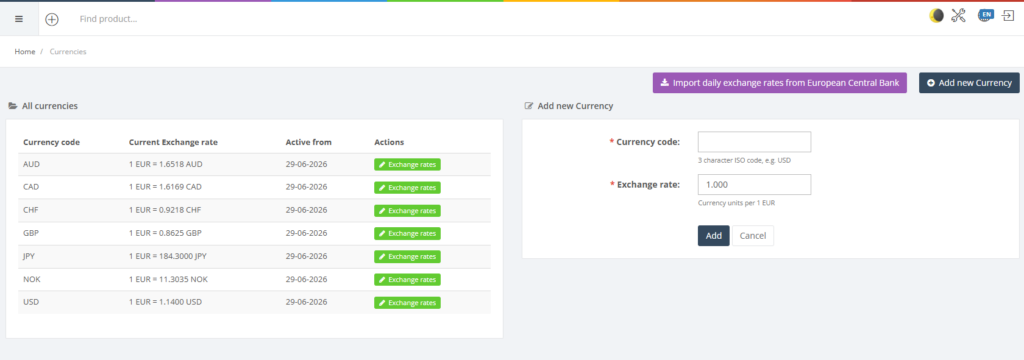
The Currencies section defines all currencies used across the ERP and their exchange rates against the base currency. It also allows you to import official daily exchange rates from the European Central Bank. The list shows each currency with its current exchange rate and the date from which the rate is valid.
Who Can Use This
Finance managers and administrators with accounting rights can manage currencies. Users should exercise caution, as exchange rates affect sales, purchases and financial reports.
Preconditions
- You must know your base currency and have permission to manage currency settings.
Navigation
Select Retail Setup → Currencies.
Step‑by‑Step Process
- Open the Currencies page. The table lists existing currencies with columns for Current exchange rate, Active from and actions.
- To import official rates, click the Import daily exchange rates from European Central Bank button. The system fetches rates and updates the table accordingly.
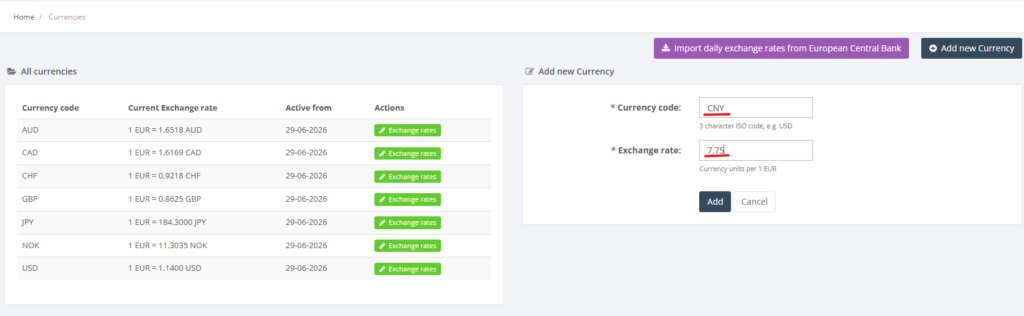
- To add a new currency, fill in the form on the right:
- Currency code (3‑letter ISO code, required).
- Exchange rate – numeric rate relative to the base currency (required).
- Click Add to save. The currency appears in the list.
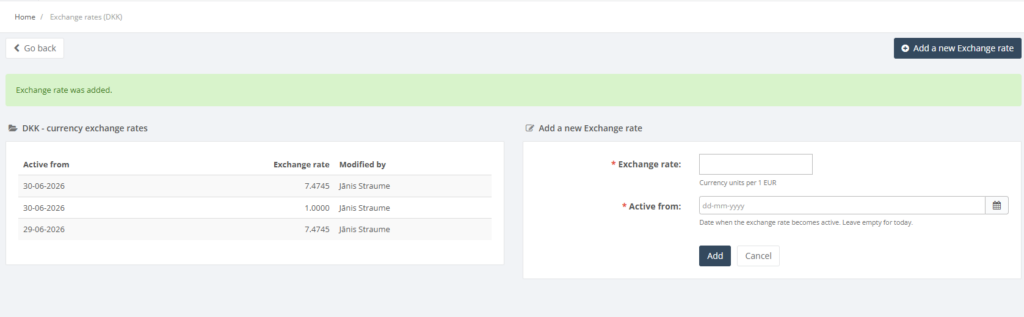
- Use the Exchange rates button in the actions column to manage historical rates for a currency.
Required Fields
- Currency code and Exchange rate are required.
Validation Rules
- Currency codes must be exactly three uppercase letters.
- Exchange rates must be positive numbers.
Common Errors
- Invalid currency code: ensure the ISO code is correct.
- Negative or zero exchange rate: rates must be greater than zero.
Troubleshooting
- If imported rates appear incorrect, verify that the system is connected to the internet.
- Review exchange rate history via the Exchange rates button if discrepancies are found in older transactions.
Related Pages
- POS Currencies – defines which currencies are accepted at the POS.
- Purchase Orders – exchange rates apply to foreign currency purchases.