
Purpose
Use the Loyalty page to enable and configure the client’s loyalty discount program in Resico ERP. This page controls whether loyalty is active, whether the loyalty discount is managed manually or calculated automatically, and which percentage and turnover rules are used for the automatic model.
Roles involved
- System administrator
- Retail manager
- Marketing / loyalty program manager
Preconditions
- You need permission to edit Client profile.
- The business should already know whether it uses a manual or automatic loyalty model.
- If the automatic model will be used, the company should define the starting discount, the increase step, the turnover threshold and the maximum discount before configuration.
Navigation path
Client profile → Loyalty
Step-by-step procedure
- Open Client profile → Loyalty.
- Enable the function using Enable loyalty.
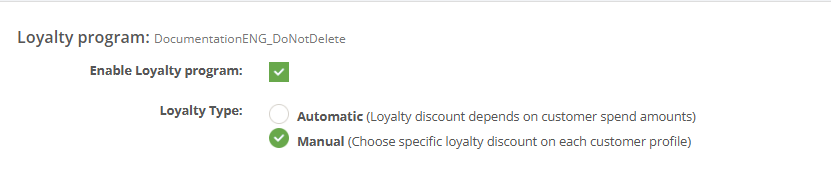
- Choose the Loyalty type. The page provides two options:
- Automatic
- Manual
- If Manual is selected, the page shows that loyalty is maintained manually. The specific loyalty discount values are not configured on this page and should instead be maintained through the related customer process.
5. If Automatic is selected, fill the loyalty calculation fields:
- Initial discount rate
- Step percent rate
- Step amount
- Max discount rate
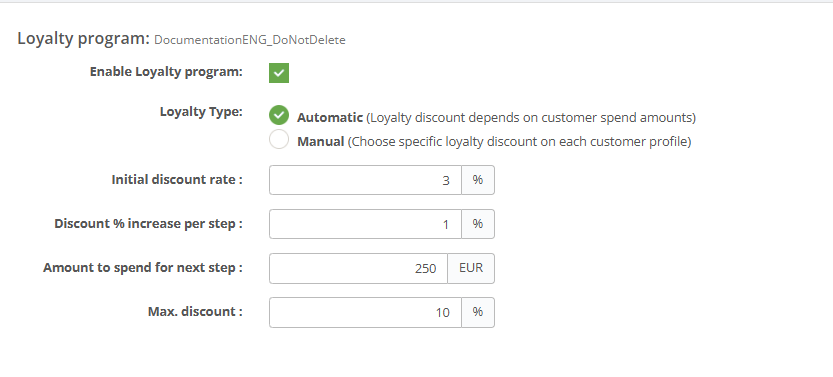
This would work as:
€0 spent → 3% discount
€250 spent → 4% discount
€500 spent → 5% discount
€750 spent → 6% discount
Maximum discount capped at 10%
6. Review the currency shown next to Step amount. The page uses the client currency if it is configured; otherwise it shows EUR.
- Click Save to apply the configuration.
- Use Cancel to leave the page without saving.
Required fields
- Enable loyalty must be turned on when the loyalty program is used.
- Loyalty type
- When Automatic is used:
- Initial discount rate
- Step percent rate
- Step amount
- Max discount rate
Validation rules
- Initial discount rate, Step percent rate and Max discount rate are percentage values.
- Step amount is a numeric value in the client currency shown on the page.
- The automatic loyalty fields are only relevant when Automatic loyalty is selected.
- The manual loyalty option does not use the automatic calculation fields.
Exceptions
- When Manual is selected, the page does not provide a separate configuration block with rates or thresholds.
- The automatic and manual modes represent different operating models, so switching between them can change how loyalty discounts are maintained in practice.
- The page only defines the client-level loyalty model. Customer-level values and transaction-level behavior can still depend on the wider loyalty process implemented in the tenant.
Common errors
- The wrong loyalty type is selected, so users expect automatic discount calculation while the client is actually using manual loyalty maintenance.
- The automatic loyalty percentages are entered incorrectly, causing discounts that are too low or too high.
- The Step amount is misunderstood, leading to an incorrect turnover threshold for discount increases.
- Users enable loyalty without testing how the selected model behaves in live customer transactions.
Troubleshooting
- If loyalty discounts do not behave as expected, first confirm whether the client is set to Automatic or Manual.
- If the client uses the automatic model, review all four calculation fields and compare them with the intended business policy.
- If the client uses the manual model, verify that the related customer maintenance process is in place, because this page does not define manual discount values directly.
- After any change, test the loyalty logic with one controlled customer transaction before using the setup broadly.
Questions / Gaps
- The page clearly shows the automatic loyalty parameters, but the exact calculation formula used by the system should still be confirmed in live use.
- The page includes informational text for Automatic and Manual loyalty, but the full downstream maintenance process for manual loyalty should be confirmed with the customer and sales workflows used in this tenant.
- It should also be confirmed whether historical customer turnover is recalculated immediately after changing the loyalty model or rates.