
Overview
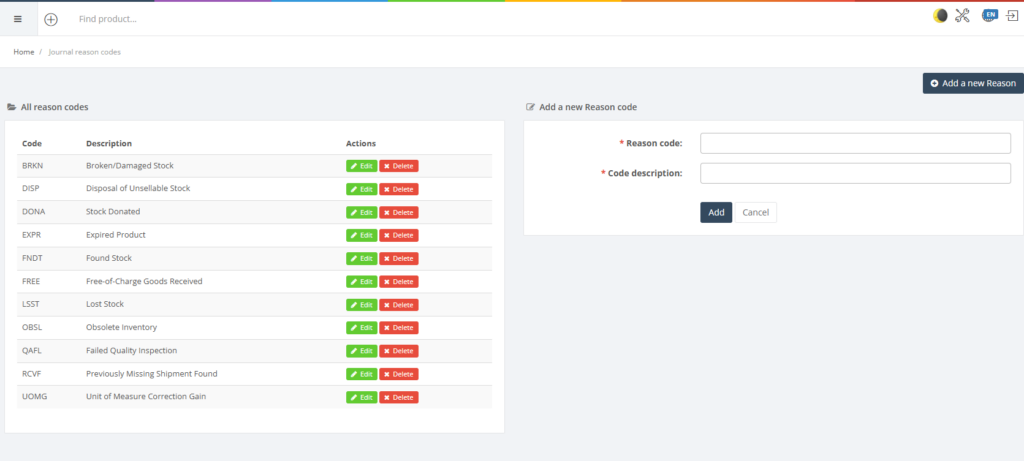
Journal reasons provide standardised codes that explain why inventory adjustments are made. For example, you might use a reason code when you write off expired goods or remove items damaged in transit. The Journal Reasons page lists existing codes and allows you to add new ones.
Who Can Use This
Inventory managers and administrators with journal rights can manage reasons. Ordinary users select a reason when recording an adjustment or transfer.
Preconditions
- Users must have permission to view and/or edit Journal Reasons.
Navigation
Select Retail Setup → Journal Reasons.
Step‑by‑Step Process
- Open the Journal Reasons page. Existing reasons are displayed with columns for Reason code, Description and actions.
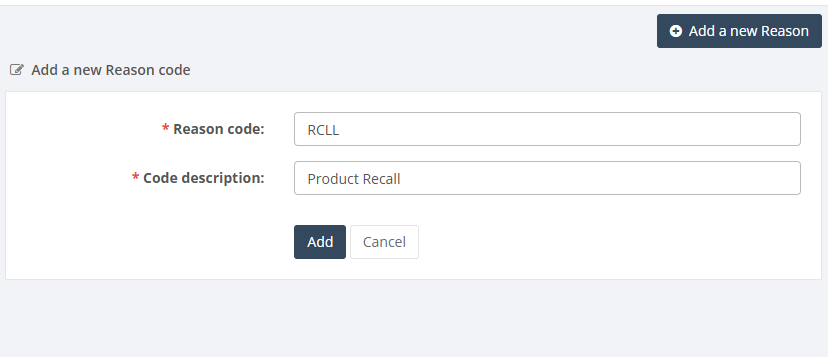
- To create a new reason, enter the Reason code (required) and a descriptive Code description (required) in the form on the right.
- Click Add to save. The new reason appears in the list.
- Use the edit and delete actions to modify or remove existing reasons.
Required Fields
- Reason code: a short code to identify the reason (required).
- Code description: descriptive text explaining the reason (required).
Validation Rules
- Reason codes must be unique and cannot be left blank.
- Descriptions should clearly explain the reason to avoid misuse.
Common Errors
- Duplicate code: cannot create two reasons with the same code.
Troubleshooting
- If users cannot see new reason codes in journals, ensure the codes were saved and that there are no filtering restrictions.
Related Pages
- Adjustment Journals – require a reason code for each line.