1. Home
  2. Docs
  3. Home
  4. Retail Setup
  5. POS

POS

Overview

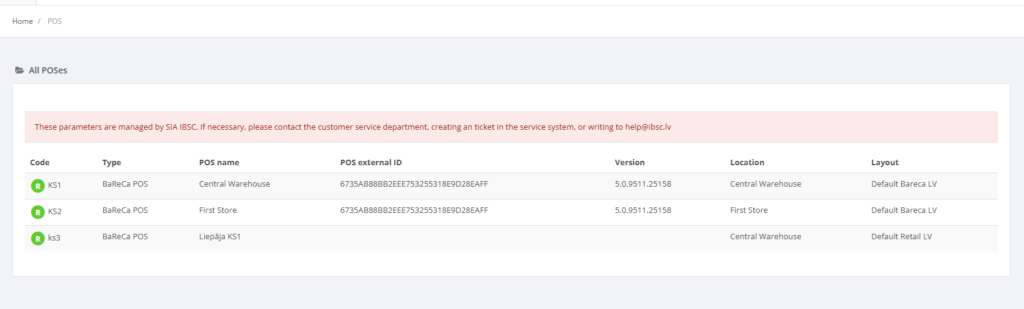
The POS section lists all configured point‑of‑sale (POS) terminals, including their code, terminal type, name, external ID, software version, assigned location and layout. This list allows administrators to verify which terminals are active and where they are deployed. Like the locations page, the POS list is read‑only in the demonstration environment – a red notice states that POS parameters are managed by SIA IBSC【127238739766882†screenshot】.

Who Can Use This

Users with Retail setup or Administrator permissions can view the POS list. Editing and adding POS terminals is restricted to Resico support.

Preconditions

  • You must be logged into Resico ERP with rights to view retail setup.

Navigation

Go to Retail Setup → POS.

Step‑by‑Step Process

  1. Open the POS page. The system displays a table of POS terminals with columns Code, Type, POS name, POS external ID, Version, Location and Layout【127238739766882†screenshot】.
  2. Use the search bar to filter the list if needed. You can click a row to view details, but editing and deletion are not available to normal users.
  3. If you require changes (e.g., adding a new POS or changing a layout), contact Resico support. The red banner explains that parameters are centrally managed and cannot be modified by end users【127238739766882†screenshot】.

Required Fields

When a new POS is created by support staff, they must specify at least a unique code, a terminal type and the location to which the POS is assigned. The POS name and external ID help identify the terminal in reports.

Validation Rules

  • POS codes and external IDs must be unique.
  • Each POS must be assigned to a valid location and layout.

Common Errors

  • Unable to create or edit POS terminals: normal users cannot modify POS settings. This is by design and not an error.

Troubleshooting

  • If a POS is reporting incorrect data, verify that the assigned layout and location are correct. If changes are required, contact Resico support.

Related Pages

  • POS Layouts – defines button layouts used by terminals.
  • Locations – indicates where each POS is located.