
Purpose
Use the Customer Sales report to analyze sales by customer group and customer, with optional item-level detail.
Roles involved
- Sales manager
- Retail analyst
- Customer relationship manager
Preconditions
- The user needs permission to read Customer Sales.
- Customer groups and sales data must exist.
Navigation path
Reports → Customer Sales
Step-by-step procedure
- Open Reports → Customer Sales.
- Select the Date range.
- Optionally filter by one or more Locations and Customer groups.
- Enable Show items if item-level detail should be included in the result.
- Click Filter.
- Review the grouped output: customer group totals, then customer totals, and optionally item-level lines when Show items is enabled.
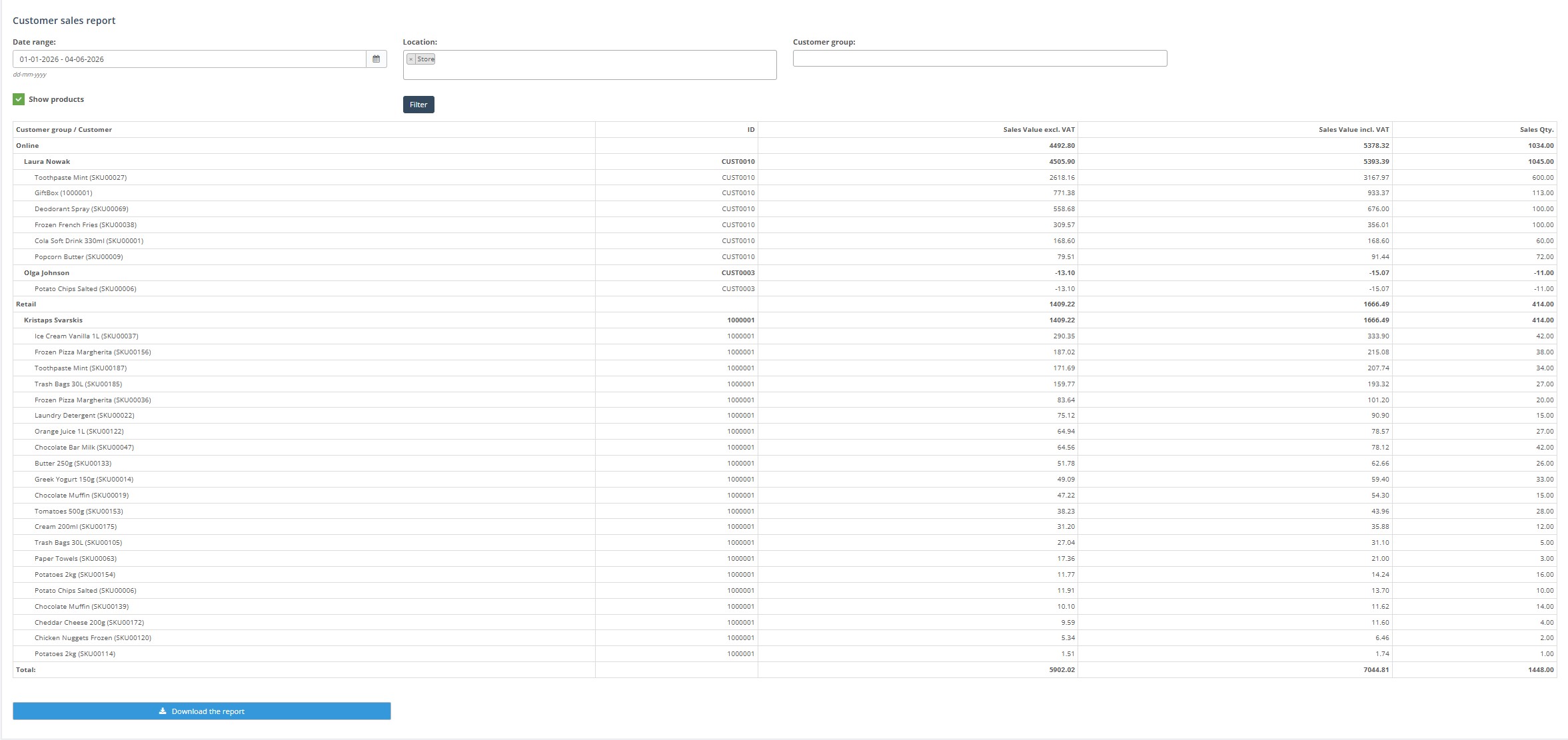
- Use Download report when you need an exported version.
Required fields
- Valid date range
Validation rules
- Selected customer groups and locations must exist.
Exceptions
- The result changes when Show products is enabled, because the report then groups by customer and item instead of customer only.
Common errors
- Users compare results from Show items and non-Show items mode without realizing the grouping is different.
- Customer groups are filtered incorrectly and users think customers are missing.
Troubleshooting
- If the report is too broad, filter by customer group or location.
- If item detail is missing, enable Show products and rerun the report.