
Purpose
Use the PEPPOL page to configure the client’s PEPPOL / XML e-invoice integration in Resico ERP. This page controls whether PEPPOL is enabled, stores the API environment and authorization values, defines the XML address scheme, and maintains unit and VAT mappings between Resico and PEPPOL.
Roles involved
- System administrator
- Finance manager
- E-invoicing / integration specialist
Preconditions
- You need permission to edit Client profile.
- The client must already know whether the test or production PEPPOL environment should be used.
- The PEPPOL username, API key and address scheme must be available before setup.
- Resico units of measure and VAT groups should already exist because this page maps them to PEPPOL values.
Navigation path
Client profile → PEPPOL
Step-by-step procedure
- Open Client profile → PEPPOL.
- Enable the integration using Enable PEPPOL.
- In the Authorization settings section, select the PEPPOL API environment.
- Test
- Production
- Enter the authorization values:
- Username
- API key
- In the XML settings section, select the Address scheme.
- In the Mapping settings section, review all Resico Units listed on the left side and map each one to the corresponding PEPPOL unit value.
- The available values are standard PEPPOL units of measure.
- Select the PEPPOL value that best matches the business purpose of the Resico unit.
- Review all Resico VAT rows listed on the page and map each VAT to the corresponding PEPPOL VAT value.
- The available values are standard PEPPOL VAT categories.
- Select the PEPPOL category that corresponds to the client’s tax treatment.
- For VAT rows where the Resico VAT percentage is 0, review the additional exception mapping field that appears below the main VAT mapping and select the appropriate extra PEPPOL VAT value if required.
- This field can be used to specify a PEPPOL VAT exemption reason.
- Select the value that best matches the applicable tax exemption scenario.
- In the Other settings section, enable XML mail if XML-based mail delivery should be used in the e-invoice process.
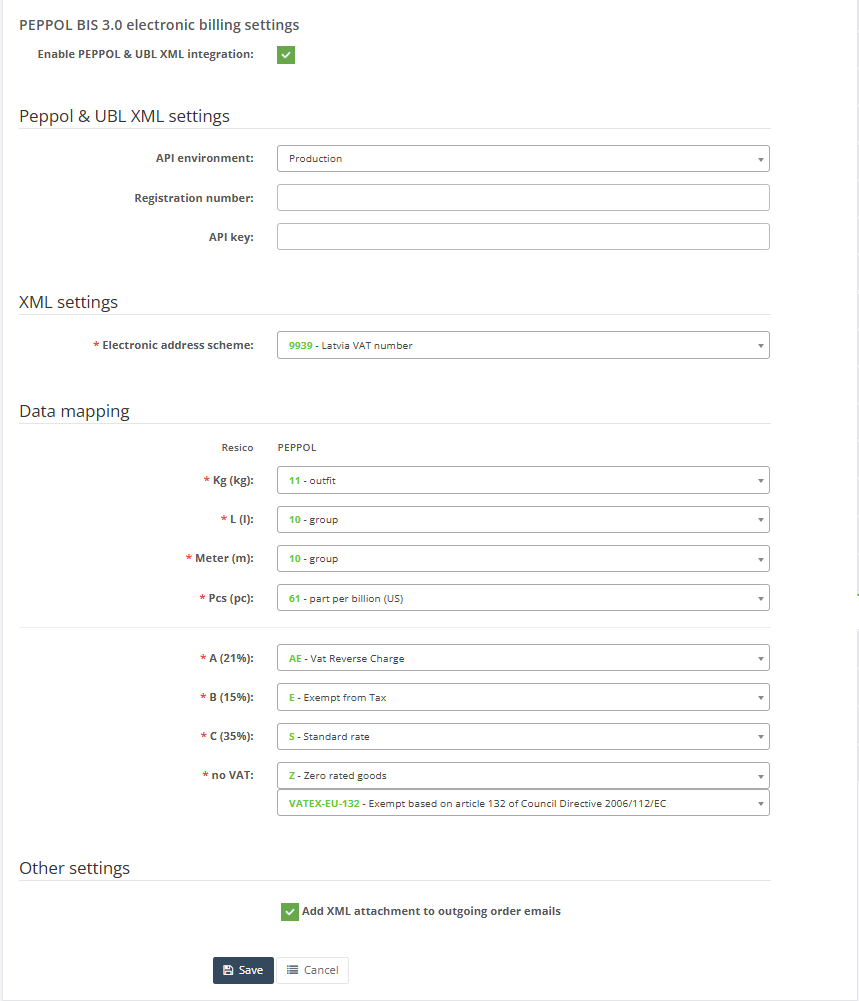
10. Click Save to apply the configuration.
11. Use Cancel to leave the page without saving.
Required fields
- PEPPOL API environment
- Username
- API key
- Address scheme
- Unit mapping for each listed Resico unit
- VAT mapping for each listed Resico VAT row
Additional required mapping when applicable:
- Extra VAT mapping for zero-VAT rows that require the second PEPPOL VAT selector
Validation rules
- PEPPOL API environment must be selected from the available list.
- Address scheme is mandatory.
- Each listed Resico unit should be mapped to one PEPPOL unit value.
- Each listed Resico VAT row should be mapped to one PEPPOL VAT value.
- For VAT rows with 0% VAT, the additional PEPPOL VAT selector may also need to be completed depending on the e-invoice scenario.
- The page uses dynamic PEPPOL value lists for address scheme, units and VAT mappings.
- Unit mappings should use the most appropriate PEPPOL standard unit for the corresponding Resico unit
- VAT mappings should use the PEPPOL category that correctly represents the client’s tax treatment.
- When using 0% VAT, an additional PEPPOL exemption code may be required depending on the invoice scenario.
Additional VAT Mapping for 0% VAT
For VAT groups configured with 0% VAT, an additional PEPPOL VAT code may be required.
- PEPPOL often requires not only the VAT category, but also the legal reason why VAT is not applied.
- The available values in the list are standard PEPPOL VAT exemption codes.
- Choose the exemption code that matches the client’s actual tax scenario and legal requirements.
- If the correct exemption reason is unclear, consult the client’s accounting team or PEPPOL implementation specialist before completing the configuration.
Exceptions
- The available PEPPOL values for address scheme, units and VAT mappings are loaded dynamically and can vary by environment.
- The additional VAT exception field appears only for Resico VAT rows where the VAT percentage is zero.
- The page contains some commented legacy fields in code for username, password, port and export frequency, but those are not part of the active page workflow.
Common errors
- The wrong API environment is selected, causing the client to point to the wrong PEPPOL endpoint.
- Username or API key is entered incorrectly, preventing authorization.
- Unit mappings are incomplete, causing XML export problems for products that use unmapped units.
- VAT mappings are incomplete or incorrect, causing invoice XML validation errors.
- The zero-VAT exception mapping is missed for a VAT row that requires it.
- Mapping a Resico unit to an incorrect PEPPOL unit, causing quantities to be interpreted incorrectly by the receiving system.
- Selecting a PEPPOL VAT category that does not correspond to the client’s actual tax treatment.
- Using an incorrect VAT exemption code for 0% VAT transactions.
Troubleshooting
- If PEPPOL export fails, first verify the selected PEPPOL API environment, Username and API key.
- If XML validation errors occur, review the Address scheme and check all unit and VAT mappings carefully. Ensure that the selected values correspond to the appropriate PEPPOL standard codes for the client’s business and tax requirements.
- If issues affect only zero-VAT transactions, confirm whether the additional VAT exception field was completed for the relevant VAT row.
- After any mapping change, test the configuration with one controlled e-invoice before using it broadly.
Questions / Gaps
- The PEPPOL value lists are loaded dynamically, so the exact selectable values for address scheme, units and VATs should be confirmed directly in the live tenant.
- The exact business meaning of the second VAT selector for zero-VAT rows should be confirmed with a real PEPPOL export scenario.
- It should also be confirmed whether enabling XML mail affects only delivery method or also changes XML generation behavior.