
Purpose
The Points page is used to configure the customer loyalty points program.
- The configuration determines
- Whether points expire automatically after a defined period.
- Whether the points program is active.
- How customers earn points from purchases.
- How points are converted into currency value.
Roles involved
- System administrator
- Retail manager
- Marketing / loyalty program manager
Preconditions
Before configuring the points program, obtain the following information:
- Whether the loyalty points program should be enabled.
- How customers should earn points.
- What value the points should have when redeemed.
- Whether points should expire automatically.
- The desired expiration period, if expiration is required.
Navigation path
Client profile → Points
Information Required For support:
Options – Do you want to enable the loyalty points program?
- Yes
- No
What it means – When enabled, customers can earn and redeem loyalty points.
Points ratio – How much money must a customer spend to earn 1 point?
- 1 EUR = 1 point
- 5 EUR = 1 point
- 10 EUR = 1 point
What it means:- i f the ratio is configured as 10 EUR = 1 point, then:
- Spending 10 EUR earns 1 point.
- Spending 100 EUR earns 10 points.
Points rate – What monetary value should 1 point have?
- 1 point = 1 EUR
- 1 point = 0.50 EUR
- 1 point = 0.10 EUR
What it means – if configured as 1 point = 1 EUR, then:
- 10 points can be redeemed for 10 EUR.
If configured as 1 00 points = 1 EUR, then:
- 100 points can be redeemed for 1 EUR.
Membership points auto-delete – Should unused points expire automatically?
- Yes
- No
What it means – when enabled, points older than the configured validity period are automatically removed.
Warning: Deleted points cannot be recovered.
Term of active points – How long should points remain valid before expiring?
Available values:
- 1 month
- 2 months
- 3 months
- 4 months
- 5 months
- 6 months
What it means – Points older than the selected period will be automatically deleted.
- If the term is set to 4 months, points that exceed four months of age will expire.
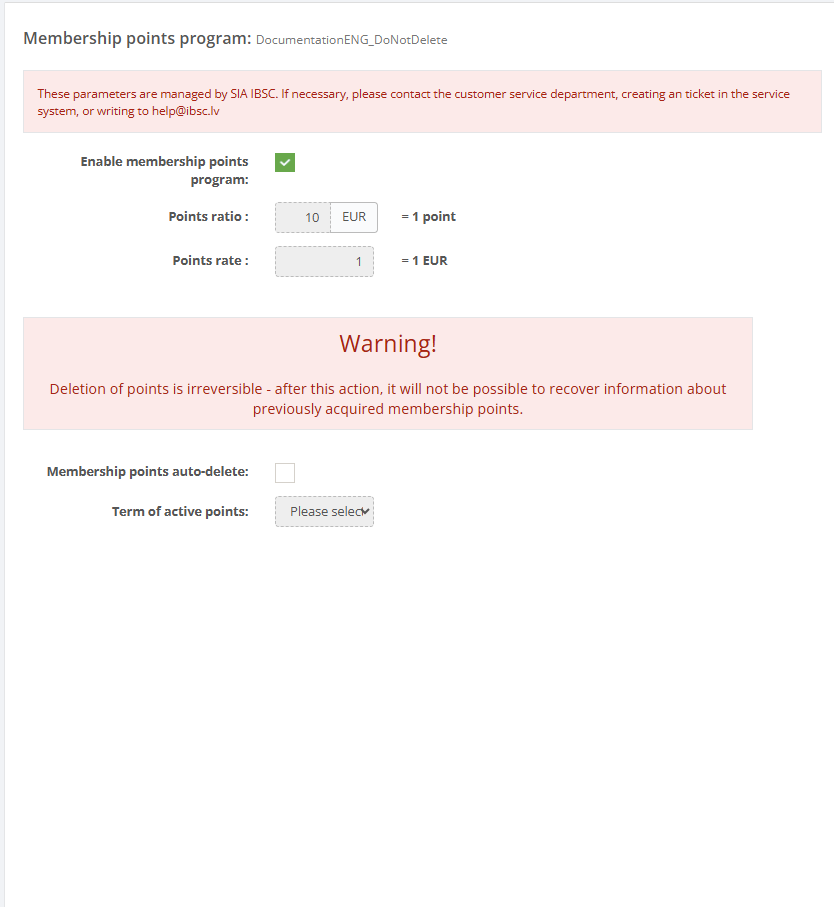
Required fields
- Enable points – must be enabled to activate the points program.
- Membership ratio – defines the spending amount required to earn one point.
- Membership points rate – defines the conversion between points and currency.
Additional fields when expiration is used:
- Enable points delete
- Points delete term
Validation rules
- Membership ratio must be numeric.
- Membership points rate must be numeric.
- Points delete term must be selected from the available list (1–6 months).
- The currency shown next to Membership ratio uses the client currency, or EUR if none is configured.
Troubleshooting
- If customers receive too many or too few points, verify the configured Points ratio.
- If redemption values are incorrect, verify the configured Points rate.
- If points disappear unexpectedly, check whether Membership points auto-delete is enabled.
- After configuration changes, perform a test transaction to verify the calculation.
Questions / Gaps
- The page limits expiration to 1–6 months. Confirm whether this range can be changed in system configuration.
- Verify whether points balances are recalculated when loyalty parameters are modified.
- Confirm whether point deletion runs automatically through scheduled background processing.