1. Home
  2. Docs
  3. Home
  4. Retail Setup
  5. Locations

Locations

Overview

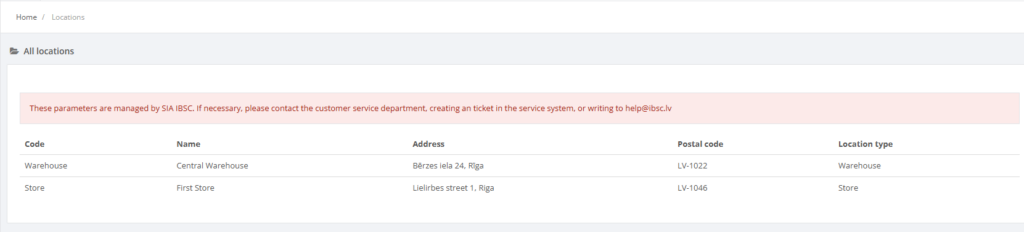
The Locations page lists every store, warehouse or other location configured in Resico ERP. Each row in the list includes the location code, name, address, postal code, price group and location type, giving managers a quick overview of where products are held and sold. In the demonstration environment the list is read‑only; a red banner explains that location parameters are centrally managed by the Resico support team, so users cannot add or edit locations without contacting IBSC【226455189432723†screenshot】.

Who Can Use This

Only users with Retail setup or Administrator privileges can view the locations list. There are no edit or creation actions available for normal users.

Preconditions

  • You must have permission to access the Retail Setup menu.
  • Use a supported web browser and log in to Resico ERP.

Navigation

From the main menu select Retail Setup → Locations.

Step‑by‑Step Process

  1. Open the Locations page. The system displays a table showing all existing locations with columns for code, name, address, postal code, price group and location type【226455189432723†screenshot】.
  2. Use the search box or table filters (if available) to find a specific location.
  3. To change location information you must contact Resico support. The demonstration environment does not provide Add or Edit buttons because locations are centrally managed【226455189432723†screenshot】.

Required Fields

There are no editable fields for standard users. When locations are added by support staff, at minimum the location code, name and address are required.

Validation Rules

  • Location codes must be unique across the system.
  • Each location is assigned to a price group and location type; these are set by the support team.

Common Errors

  • Cannot add or edit locations: This is expected behaviour in the demo system. Locations can only be modified by IBSC.

Troubleshooting

  • If you need to create or modify a location, contact your Resico support representative.

Related Pages

  • POS – POS terminals are assigned to specific locations.
  • Price Groups – each location belongs to a price group.