
Purpose
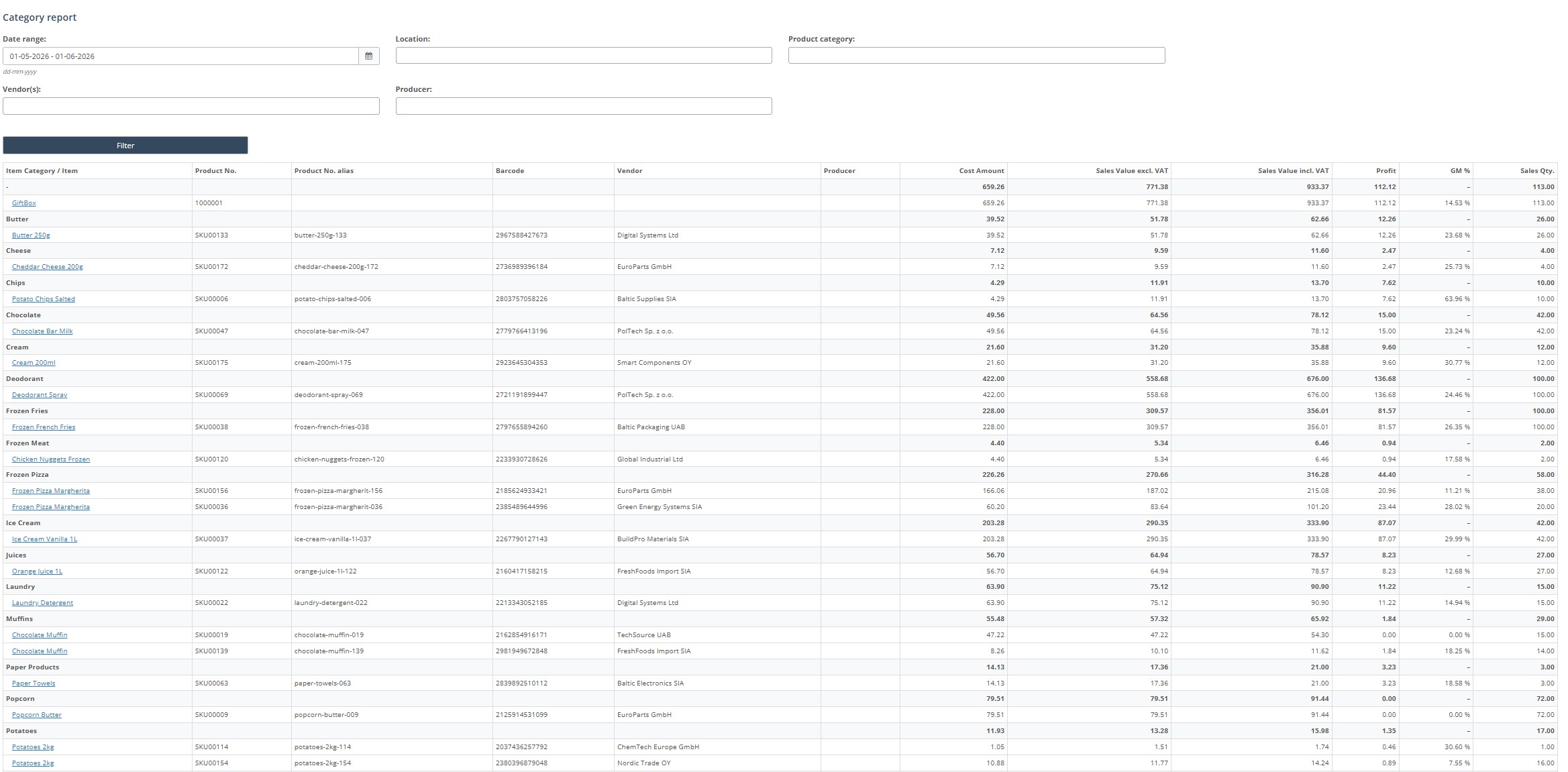
Use the Category report to review sales, cost, profit, GM and sales quantity grouped by product category, with drilldown to individual items.
Roles involved
- Category manager
- Retail analyst
- Store manager
Preconditions
- The user needs permission to read the Category report.
- Sales data, categories, vendors and producers should exist.
Navigation path
Reports → Category report
Step-by-step procedure
- Open Reports → Category report.
- Select the Date range.
- Optionally filter by Locations, Product category, Vendors and Producer.
- Click Filter.
- Review the result table. The report shows category totals and item-level lines below each category.
- Use the columns for cost amount, sales value including VAT, sales value excluding VAT, profit, GM and sales quantity.
- At the bottom of the page click Download report to export the result.
Required fields
- Valid date range
Validation rules
- Selected categories, vendors and producers must exist in setup.
Exceptions
- The report displays category totals first and item lines below, so totals and detail are shown together on the same page.
Common errors
- Users compare item-level data to category totals without noticing the grouped structure.
- Users forget to set the correct date range and compare wrong periods.
Troubleshooting
- If the report is too broad, narrow it by category, vendor or producer.
- If GM or profit looks wrong, compare with sales and cost data for the same period.