
Purpose
Use the Webhooks page to configure outbound webhook delivery from Resico ERP. This page controls whether hooks are enabled, stores the destination URL and authorization value, and defines which objects, actions and fields should be included in the webhook payload configuration.
Roles involved
- System administrator
- Integration specialist
- Developer / technical partner
Preconditions
- You need permission to edit Client profile.
- A receiving endpoint must already exist and be reachable from the ERP environment.
- You should know which business objects, actions and fields the receiving system needs.
- The authorization value required by the receiving service should already be prepared.
Navigation path
Client profile → Webhooks
Step-by-step procedure
- Open Client profile → Webhooks.
- Enable the feature using Enable hooks.
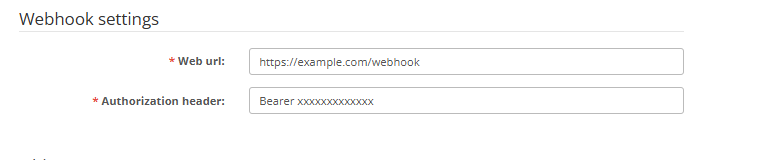
- In the Settings section, enter:
- Hooks URL – the destination endpoint that will receive webhook requests
- Hooks auth – the authorization value sent with the webhook request
- In the Objects section, review each available webhook object listed on the page.
- For each object row, select the required webhook actions in the middle column. The page builds these actions dynamically, and each action is shown as a separate checkbox.
- For the same object row, select the required output fields in the right column. These field checkboxes define which columns / fields are included for that object.
- Repeat the configuration for every object that should send webhooks.
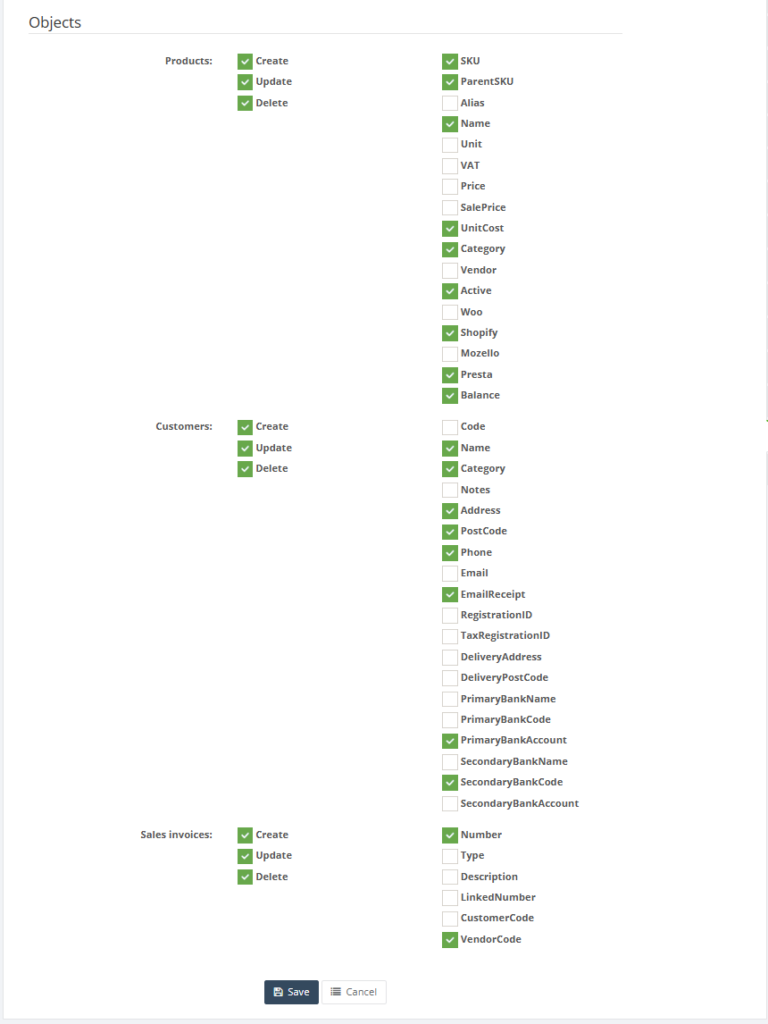
8. Click Save to apply the configuration.
9. Use Cancel to leave the page without saving.
Required fields
- Hooks URL
- Hooks auth
Additional required selections when webhooks are used:
- At least one webhook object
- At least one action for each enabled object
- The required output fields for each enabled object
Validation rules
- Hooks URL is mandatory.
- Hooks auth is mandatory.
- Webhook actions are configured per object.
- Webhook fields are configured per object.
- The exact action names are loaded dynamically from the system and are shown as individual checkboxes.
- The exact field list is also loaded dynamically per object.
Exceptions
- The page does not show a fixed list of webhook objects in code; the available objects are loaded dynamically from the system model list.
- The exact payload structure depends on which object, action and field checkboxes are selected.
- Saving the setup does not itself test the receiving endpoint; endpoint availability must be validated separately.
Common errors
- The webhook URL is incorrect, so the receiving system never gets the requests.
- The authorization value does not match what the receiving endpoint expects.
- The wrong object actions are selected, so webhooks are sent on the wrong events.
- Required fields are not selected, so the receiving system gets incomplete payload data.
- Users enable hooks but do not test with a real object change afterwards.
Troubleshooting
- If the receiving system gets no requests, first verify the Hooks URL and Hooks auth values.
- If requests arrive but are missing data, review the selected field checkboxes for the relevant object.
- If requests are triggered at the wrong time, review the selected action checkboxes for that object.
- After saving the setup, test with one controlled record change in the relevant module.
Questions / Gaps
- The page clearly supports object, action and field-level webhook configuration, but the exact list of available objects and actions should be confirmed directly in the live tenant.
- The exact request format, header structure and retry behavior are not visible on this page and should be confirmed in production use.
- It should also be confirmed whether disabled objects send no requests at all or whether object-level behavior depends entirely on the action selection.