
Purpose
Use the Options page to enable or disable client-level ERP features. These settings affect how products, customers, documents, POS behavior, reservations and support access work across the whole Resico ERP environment.
Roles involved
- System administrator
- Retail operations manager
- Implementation / support team
Preconditions
- You need permission to edit Client profile.
- Before enabling structural features such as batch numbers, serial numbers, product attributes or reservations, make sure the business process and master data are ready.
- If the client uses WebPOS, kiosk, data terminal or other advanced functions, confirm that the related implementation has already been prepared.
Navigation path
Client profile → Options
Step-by-step procedure
- Open Client profile → Options.
- Review the feature switches shown on the page. The page is primarily a checkbox-based setup screen.
- In the general / operational section, review and update:
- Enable support access
- Live BOM Produce
- Use Data Terminal
- Use WebPOS
- Use Price Groups
- Use Product Expiration Dates
- Use Serial Numbers
- Use Batch Numbers
- Use Product Attributes
- Use Product Groups
- Use Product Aliases
- Use Product min/max inventory
- Use KIOSK Functionality
- Hide parent products
- Labels per user
- Kitchen printers as product category
- Review customer-related behavior:
- Customer unique identifier
- Ask To Create Barcode
- Send product balance to POS
- Send sale price to POS as standard price
- Use sale price in sales invoices
- Review reservation and approval behavior:
- Product Reservation
- Partial approve
- Partial payment
- Review document and process-related options shown in the lower part of the page. These are grouped by area such as:
- Products
- Customers
- Purchase orders
- Sales invoices
- Offers
- Prepayment invoices
- Adjustment journals
- Transfer journals
- Review the Giftcards Management switch if the client uses gift cards.
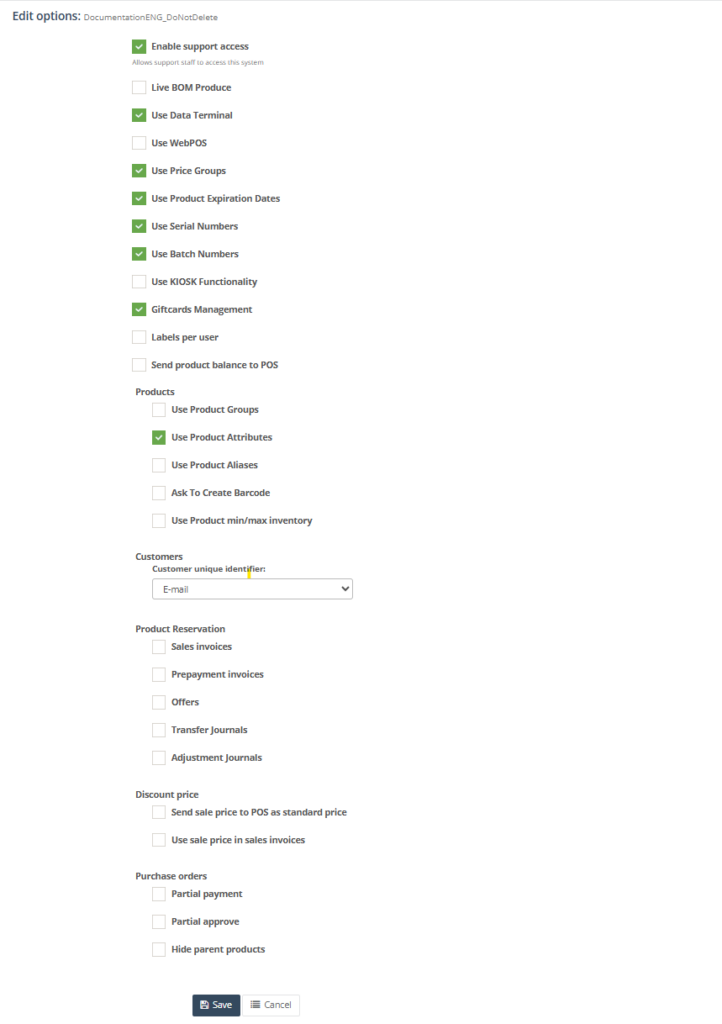
8. Save the page after confirming the business impact of the selected options.
Required fields
- There are no universally mandatory text fields on this page, but every enabled option should be intentionally reviewed before saving.
- Customer unique identifier should be selected when customer identification logic is used.
- Feature switches that impact products, POS or reservations should only be enabled when the related setup is ready.
Validation rules
- Checkbox options can be enabled only when the tenant supports the related feature.
- Customer unique identifier should match the actual customer search logic used by POS, webshop or integrations.
- Reservation-related options should be consistent with the company’s operational document flows.
- Features such as batch numbers, serial numbers, product attributes and price groups should only be enabled when the corresponding master data and transaction handling are prepared.
Exceptions
- Some switches are implementation-specific and may be used only in certain tenant types or countries.
- Enable support access should only be switched on according to the company’s support policy.
- Some related module-level behavior may still depend on additional setup outside this page.
Common errors
- Enabling batch or serial control without preparing product master data causes operational issues in purchasing, inventory or sales workflows.
- Changing the customer identification rule creates duplicate or unmatched customer records across channels.
- Reservation-related options are enabled without testing and start affecting inventory unexpectedly.
- Users assume that enabling a feature here is enough, while related setup in POS, products or integrations is still missing.
Troubleshooting
- After changing any structural option, test one real workflow in the affected module before using it in production.
- If a feature does not appear after enabling it, verify user permissions and the related setup records.
- If POS-related behavior is unchanged after saving, check whether POS synchronization or re-login is required in that environment.
- Document all major option changes internally because they affect user training and process behavior.
Questions / Gaps
- The exact effect of each lower-page module-level toggle should be confirmed in live use, because the page groups multiple operational areas on one configuration screen.
- It should be confirmed which switches take effect immediately and which require POS synchronization, re-login or background processing.
- Some options are visible in code but their precise end-user labels or tenant-specific availability can vary by implementation.