
Purpose
Use the Default values page to define client-level defaults that are reused when creating products and sales documents. This page helps reduce manual data entry by setting the standard unit of measure, VAT, currency, payment method, payment terms, e-mail language and electronic printout behavior.
Roles involved
- System administrator
- Finance manager
- Sales operations manager
Preconditions
- You need permission to edit Client profile.
- Units of measure, VAT groups, Currencies and available language codes should already exist in setup.
- Before editing payment settings, the business should know which payment method and payment term should be used as the client default.
Navigation path
Client profile → Default values
Step-by-step procedure
- Open Client profile → Default values.
- In the Products defaults section, select the default Unit of measure.
- Still in the product defaults area, select the default VAT group that should be suggested by default.
- In the Invoice defaults section, select the default Currency.
- Select the default Payment method. On this page the available standard values are:
- Bank transfer
- Other (if Other is selected as payment method, fill the mandatory Other payment method field.)
- Select the default Payment terms. The page provides:
- Please select
- 7 days
- 14 days
- 21 days
- 28 days
- Other (If Other is selected as payment term, fill the mandatory Other payment term field. This field is numeric and is intended for a custom number of days.)
- Select the default Mail language used for outgoing document communication where this default is applied.
- Enable or disable Electronic printout according to the client’s normal invoice output process.
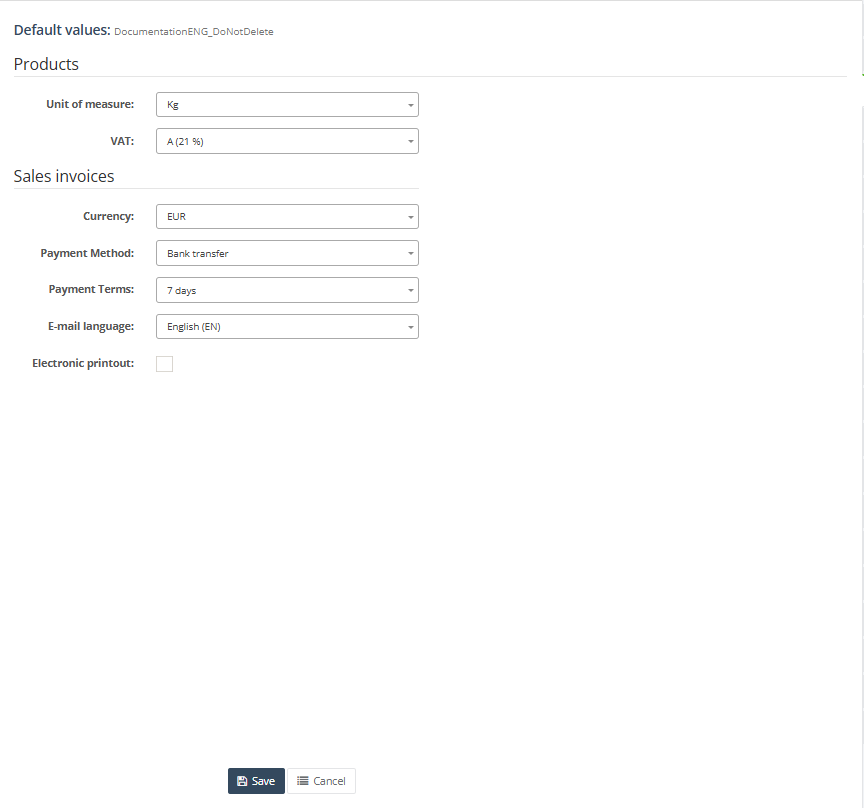
9 .Click Save to apply the changes. Use Cancel to leave the page without saving.
Required fields
- Unit of measure
- VAT
- Currency
- Payment method
- Payment terms
- Mail language
- Other payment method if payment method is set to Other
- Other payment term if payment terms are set to Other
Validation rules
- Values must be selected from configured system lists.
- Other payment method becomes mandatory when payment method is Other.
- Other payment term becomes mandatory when payment terms are Other.
- Other payment term is validated as an integer field.
- Payment terms can be disabled in some document contexts, for example when the system is working from prepayment logic.
Exceptions
- These defaults are client-level defaults. They can still be overridden elsewhere, for example on customer cards or directly on documents.
- The available Mail language list is limited to languages marked as production-ready in the system.
- Not every workflow will necessarily use every default from this page in the same way.
Common errors
- Saving fails because Other payment method or Other payment term is empty while Other is selected.
- Users expect a payment method such as cash or card here, but the page only shows the payment method values implemented on this screen.
- The wrong VAT or unit default causes incorrect values to be suggested in product or document creation.
- The wrong mail language causes outgoing document communication to use the wrong language by default.
Troubleshooting
- If default values do not appear on new documents, check whether customer-level defaults or document-specific logic are overriding the client-level defaults.
- If the page cannot be saved, review the conditional required fields for Other payment method and Other payment term.
- If the required VAT, currency or unit is missing from the dropdown, create it first in Retail Setup.
- If users report wrong e-mail language on outgoing documents, review the selected Mail language on this page and compare it with the document workflow being used.
Questions / Gaps
- The page clearly defines the available fields, but the exact scope of where each default is applied should still be confirmed in live use, especially for product defaults versus invoice defaults.
- The exact business meaning of Electronic printout should be confirmed in the client’s final process, because the checkbox exists on the page but the downstream runtime behavior is not fully visible from the screen structure alone.
- It should also be confirmed whether the limited payment method list on this page is intentional for all tenants or implementation-specific.